Windows 10 & 11 • Non-linear video editor

REEL EDITOR

A real timeline editor for Windows. Cut, layer, grade, title, keyframe and export — with every frame processed on your own machine. No account, no subscription, no cloud.

One-time purchase • Commercial use included • Available now on the Microsoft Store

What you see is what ships

Every visual effect in REEL EDITOR is implemented twice — once for the preview monitor, once for the exporter — and our test suite renders the same frame through both and compares the pixels. The preview is not an approximation of your export. It is your export.

  • Preview–export parity, verified by measurement
  • No networking code — nothing ever leaves your PC
  • No account, no telemetry, no activation
  • AI-operable through an optional local companion

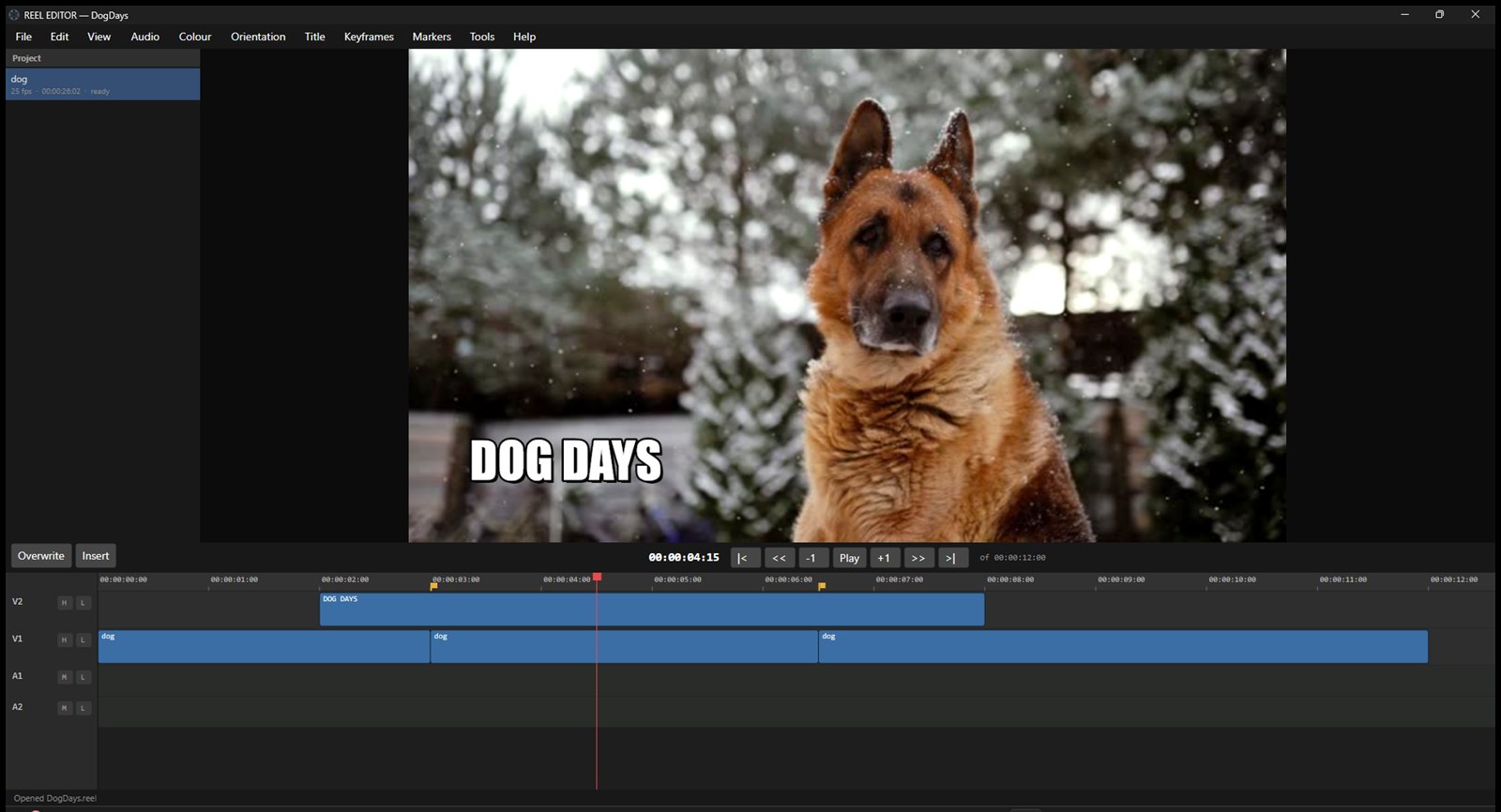
The editor, mid-edit

A real project open in REEL EDITOR: three cuts with a dissolve, two colour looks, a styled title on its own track, and markers on the cut points. The monitor is showing exactly what the export will contain.

REEL EDITOR editing a project: the monitor shows a graded shot of a dog in snowfall with a bold DOG DAYS title, above a timeline with three cuts, a title track, and markers
Close-up of the REEL EDITOR timeline: video and audio tracks, a title clip above the footage, razor cuts, markers, and the playhead

Tracks, cuts, markers and a title riding above the footage — the timeline you actually work in.

Features

Classic non-linear editing, done honestly: real tracks, real layers, and effects that export exactly as previewed.

Real Timeline Editing

Multi-track video and audio. Trim, split, and move clips with linked audio and video staying in sync. Cut, copy and paste clips — link groups and all. Markers, undo history, and project autosave with crash recovery.

Layered Compositing

Stack video tracks and the monitor shows the true composite — picture over picture, opacity and all. What the layers look like in the preview is what the exporter renders.

Colour Grading

Brightness, contrast and saturation per clip, plus six built-in looks: Punch, Soft, Faded, Bleach, Mono and Noir. Applied in the monitor and the export by the same arithmetic.

Preset Packs

Install and share looks as plain JSON files. Drop a pack in the Presets folder and the Colour and Title menus pick it up instantly — packs are data, not code, so they can never compromise the app.

Titles & Captions

Text with full control of font, size, colour, alignment, outline, shadow and background box — plus ready-made styles: Subtitle, Lower Third, Big Impact, Caption Bar and Minimal.

Transitions

Cross dissolves, wipes and slides between clips, rendered identically in preview and export.

Keyframes

Animate clip opacity and volume over time with keyframes — fade layers in and out, duck music under a voice, ramp titles.

Speed, Rotate & Flip

Retime clips faster or slower. Rotate 90°, 180° or 270° and flip horizontally or vertically — phone footage lands the right way up.

Every Aspect That Matters

Sequence presets for 16:9, 9:16, 1:1, 4:3, 4:5, 21:9 and 2:3 — YouTube, Reels, TikTok, Shorts, and print-style frames without math.

Screen & Mic Recording

Record your screen and your microphone straight from the editor and cut the result on the timeline. Recordings are written to your own Videos folder and nowhere else.

On-Device Speech-to-Text

Transcribe speech into captions using whisper.cpp running entirely on your PC. Nothing is uploaded to be transcribed — there is nothing in the app that could upload it.

Smart Analysis, Locally

Scene detection, silence detection and automatic cropping — conventional signal processing on your own machine, involving no third party and no network.

An Editor an AI Can Drive

REEL EDITOR ships with an optional companion program that lets an AI assistant operate the editor for you — place clips, cut, grade, title, export — through the open MCP standard. Tell your assistant what you want; it works the same timeline you do.

Private by Construction

REEL EDITOR contains no networking code. It cannot phone home, because there is nothing in it that can make a network connection at all. No account, no sign-in, no licence key, no telemetry, no analytics, no crash reporting.

You do not have to take our word for it: watch it with any firewall or network monitor and you will see it never opens a connection. Its Store package requests no network capability either.

Read the full privacy policy — the same text that ships inside the app.

Get REEL EDITOR

REEL EDITOR is available now on the Microsoft Store for Windows 10 and Windows 11.

REEL EDITOR

One-time purchase • No subscription

FAQ

Can I use REEL EDITOR for client work?

Yes. Commercial use is fully included — paid projects, client videos, monetised content, broadcast and streaming delivery. There is no separate commercial licence because none is required.

Does REEL EDITOR store or upload my videos?

It cannot. The application contains no networking code, so your media never leaves your machine. Everything it writes — settings, cache, projects, recordings — lives in folders you own and can delete.

Is there a subscription?

No. REEL EDITOR is a one-time purchase. You pay once and keep using it.

Does it work offline?

Entirely. Editing, effects, transcription, analysis and export all run on your PC with no connection at all. The only feature that involves a network is one you build yourself: connecting an external AI assistant, whose connection belongs to that assistant, not to REEL EDITOR.

What if it doesn't work on my PC?

Write to support@reel-editor.com. If we cannot fix it, you get your money back.

Support & Contact

Questions, feature requests, bug reports — reach out anytime.

Email: support@reel-editor.com